

Home / Timeline maker
Organize Events on a Visual Evidence Timeline
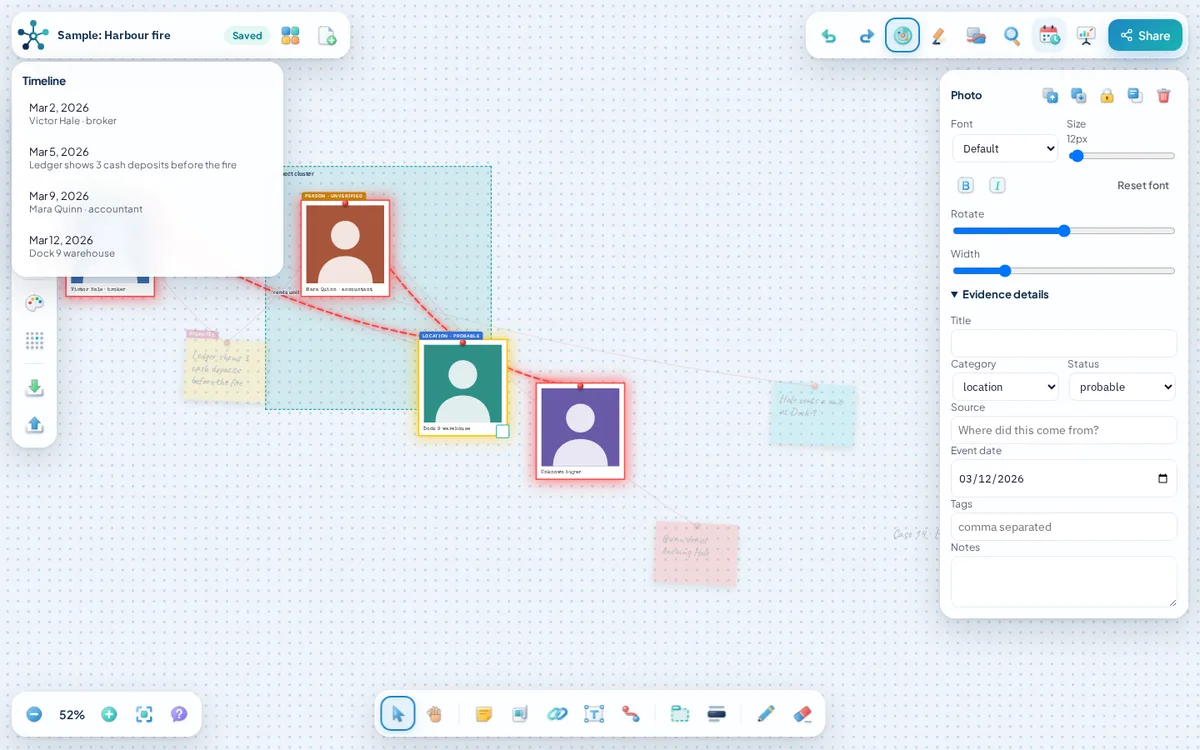
Put events in order and keep them connected to the people and evidence behind them. In AnacapaChart you give any card an event date, then use the timeline panel to read everything in order, or arrange the whole board by date.
What you can add
- Event dates. Every card has an event date field. The date is separate from when you added the card.
- Timeline panel. Lists every dated card in order. Click an entry and the board jumps to that card.
- Arrange by date. Lays dated cards out along a line, earliest first, with undated cards set apart below.
- Connected evidence. Link an event to the witness, document or place that supports it, and label the link.
- Status and source. Mark each event verified, probable, unverified or disputed and record its source.
- Case report. The printable report includes a timeline section in date order.
How to get started
- Add a card for each event.
- Open the evidence details and set the event date.
- Open the timeline panel to read the events in order.
- Choose Arrange by date from the menu to lay the board out along a line.
- Connect each event to the evidence and people behind it.
- Open the case report to print or save the timeline as a PDF.
A fictional example: the week before a break-in
Add events for a suspicious van on Monday, a broken lock on Wednesday and the break-in on Friday. Connect each to the neighbour who reported it. Arrange by date and the sequence reads left to right, with the witnesses linked underneath.
Saving, sharing and export
Boards autosave in your browser on this device and stay there until you clear your site data, so export a board file when a board matters. A share link uploads a copy of the board to our storage, so do not share anything sensitive that way.
You can export a PNG image, save a board file you can import again later, or open a printable case report and save it as a PDF from your browser.
Frequently asked questions
Can I have a card without a date?
Yes. Undated cards stay on the board and are placed apart when you arrange by date.
Is there a separate timeline canvas?
The timeline is a panel and a board layout. You can arrange by date at any time and move cards afterwards.
Can I export the timeline?
You can export a PNG image, save a board file you can import again later, or open a printable case report and save it as a PDF from your browser.
Related tools
- Evidence board maker: AnacapaChart is a free evidence board that runs in your browser.
- Relationship map maker: Use AnacapaChart as a relationship mapping tool.
- Templates: These starter boards load straight into AnacapaChart, where every card, label and link is editable.
- Guides on evidence boards and link analysis